Everyday AI
I like to think I’m one of the more advanced users of AI. People ask me how I work, what tools I use and how I manage several projects at once. Sometimes I have work to do. Sometimes I just want to see if something is possible.
- TV setup. I cleaned up my Redmi TV and built a dashboard. Startup dropped from 17 seconds to 8. I remapped the remote so my launcher, dashboard, gaming PC and Apple TV are each one button away.
- Product testing. I used AI to document the entire Japan Habba exhibitor platform: who uses it, what each person can do and how a submission moves from exhibitor to reviewer. Those flows became tests we can rerun whenever we add a feature.
- Rainwater research. Could a homestead outside Bengaluru get through the dry season on rainwater? I used monthly rainfall data to build a calculator. I can change the tank size or collection area and see when the water runs out.
My Work Stack
AI: $200 ChatGPT and $200 Claude
Wispr Flow: I press one button to start talking to my computer. I can spend five or ten minutes reviewing a website out loud, then put my cursor in the chat box and stop dictating. All my feedback goes straight into the chat.
Composio: Composio connects my email, social accounts and other tools to my AI. When Instagram, X or YouTube blocks a direct visit, I can still ask who posted what and use Composio to pull the available posts or transcripts.
Notion: My prompts, workflows, research and project notes live here. Obsidian would work just as well for me if its MCP connection gave the AI the same ability to find, read and update my work.
Deployment: GitHub for code, Vercel for deployment, Supabase for the backend. I develop in the cloud because five agents working on five projects can make my MacBook Air or iMac unusably slow.
Prompts
Most of my work falls into two modes. I use ChatGPT in Work mode for productivity and Codex for engineering. Each has its own prompt and reads the relevant workflows from Notion.
Productivity Core Prompt
- Short replies. AI writes too much. If three paragraphs can be said in two sentences, give me the two sentences.
- Find the workflow. I want to say “write a PRD” in a fresh chat and have the AI find my process and the project notes. I should only have to explain what’s new.
- Finish the task. Make the edit, check it and send me the link. Ask me if the edit changes what I’m committing to.
- Update my to-dos. When the context changes significantly, update the original to-do with what changed and what is left to do. Once the work is complete and checked, find the matching item on my lists and mark it done automatically.
- Reassess the approach. Periodically check what we are trying to achieve and why, especially when the context changes. Flag anything obvious I have missed or suggest a better way to reach the goal.
Productivity Related Workflows
I cannot put the instructions for every task into my core prompt. It becomes too long, and the AI stops following it reliably. Instead, I keep the steps for specific tasks in separate workflows. When the core prompt recognises the kind of work we have started, it directs the AI to find the relevant workflow and follow its steps.
Here are some of the workflows I use often.
Product requirements: I talk through the idea. The AI asks who will use it, what they need to do and what happens when something goes wrong. Those answers become the product requirements document (PRD).
Writing voice: I collected 100 examples of each type of interaction from my WhatsApp and email history. When I need a client follow-up, the AI can refer to how I’ve actually written one.
Daily brief: My agent reads WhatsApp’s local message folder hourly and checks email and open tasks for anything I still owe someone. I review outgoing messages before it sends them through WhatsApp Web.
Visual choices: My Lookbook puts design options side by side. I can pick the typeface from one and the layout from another in a single round of feedback.
Engineering Core Prompt
- Define success. Read the code and agree on what should happen. If I edit a value, save it and refresh, I should still see the new value.
- Small fixes. Make the smallest readable change and run the check that would catch the original problem.
- Medium tasks. Split independent pieces among subagents. One can trace the API while another checks the screens that use it. The main chat checks their findings together.
- Large projects. I use graph engineering when the work is too large for one chat. A planning chat puts the steps in dependency order. Each step gets a card with its scope and tests, and its own execution chat. I start the next chat with the verified result and handoff from the previous one.
- Delivery. Check the change locally, update the affected documentation and give me the staging link. For visual changes, show me desktop and mobile. I decide when it goes live.
Engineering Related Workflows
Product review: I review each screen by role and state. For Japan Habba, I could compare the exhibitor homepage on desktop and mobile, then open the artwork or food-menu upload screens and give feedback on each.
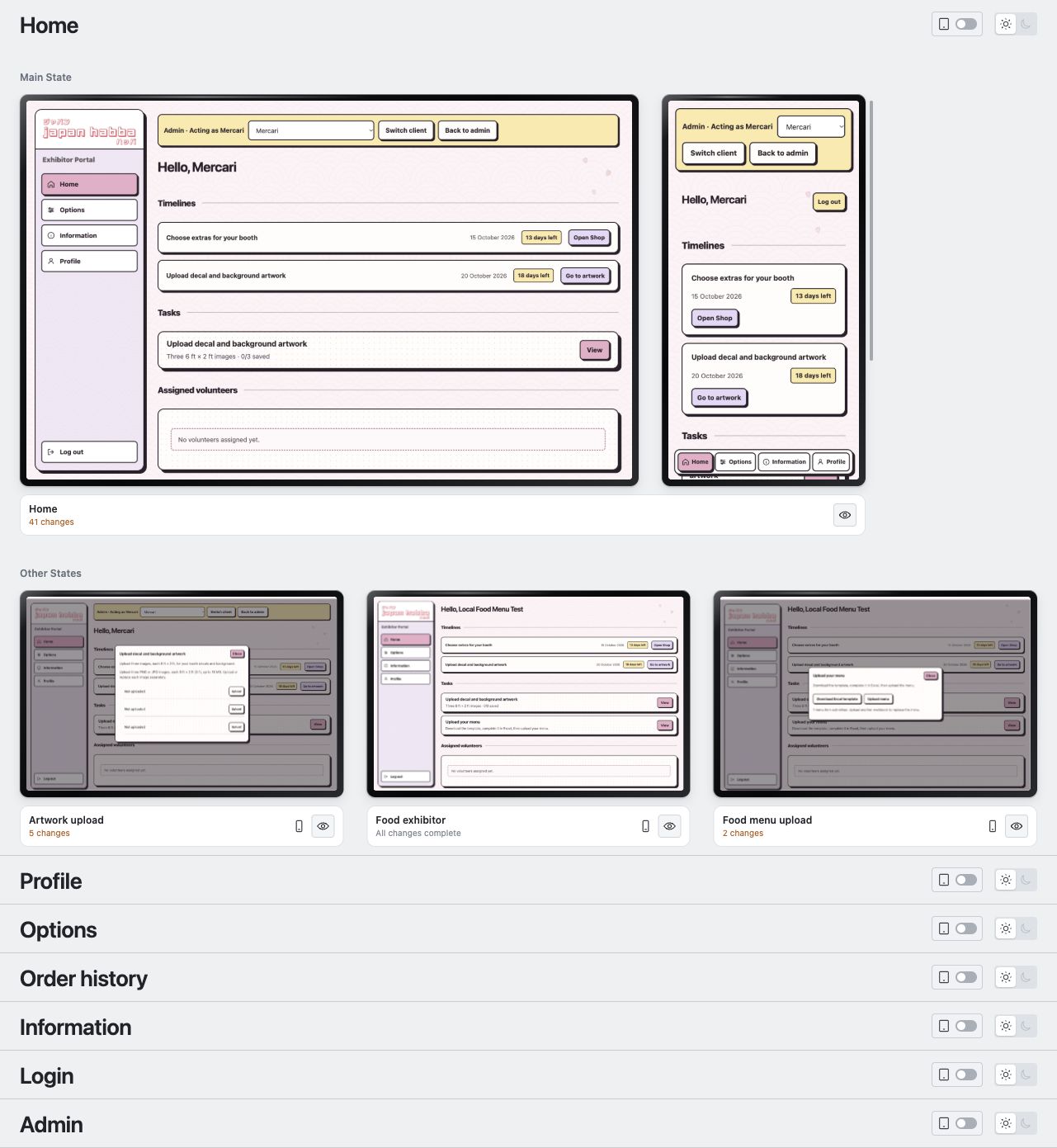
Browser testing: The test cases live with the code. A smoke test covers the basics, a detailed run follows each role’s main journeys, and a full run checks every known action in scope. The AI tests what each role can change and whether a save survives a reload. I get the passed, failed and untested cases, with a screen-by-screen report when I need one.
Comments have not loaded yet.